Ever tried to open a PDF and got nothing but an error message or a blank screen? Don’t panic. Corrupted PDFs are common, and in most cases you can fix them without needing expensive software. This guide is for anyone who has a damaged PDF file—whether it’s from a bad download, a failed transfer, or a crash. By the end, you’ll have a working PDF you can open, edit, or print.
We’ll walk through four methods: using Adobe Acrobat Reader’s built-in repair, using PDFsam (PDF Split and Merge) to reassemble pages, using an online repair service for quick fixes, and using command-line tools like Poppler if you’re comfortable with the terminal. Each method is tested and works on Windows and Mac. If one fails, move to the next. For a deeper dive, check out our guide to fix a damaged pdf or open source pdf repair.
What you’ll need
- The corrupted PDF file
- Adobe Acrobat Reader (free) installed on your computer
- PDFsam Basic (free) from pdfsam.org
- An internet connection (for online repair)
- Poppler utilities (optional, for command-line method)
Step 1: Try Adobe Acrobat Reader’s built-in repair
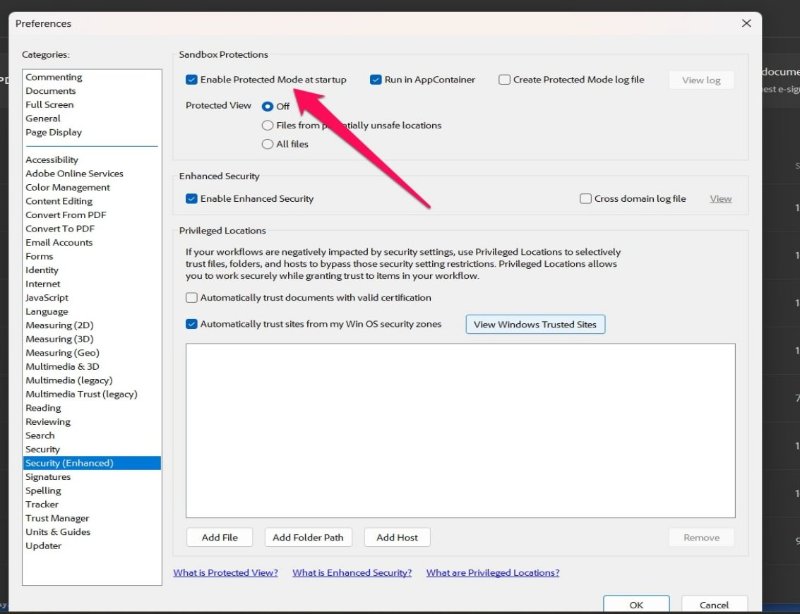
Adobe Acrobat Reader can sometimes reconstruct a corrupted PDF automatically. Open the file in Reader. If it gives an error, close it and reopen Reader. Go to Edit > Preferences > Security (Enhanced) and uncheck ‘Enable Protected Mode at startup’. Restart Reader and open the PDF again. This workaround often solves minor corruption.
If the file still won’t open, try ‘File > Print > Save as PDF’ to create a new copy. This strips out some corrupt elements. If that fails, move to Step 2.
Step 2: Use PDFsam to extract pages
PDFsam (PDF Split and Merge) is a free tool that can extract pages from a damaged PDF. Download and install PDFsam Basic. Open it and select ‘Split’ mode. Add your corrupted PDF. Choose ‘Split by number of pages’ and set it to 1. Click ‘Run’ to save each page as a separate PDF. Some pages may be recoverable even if the whole file isn’t.
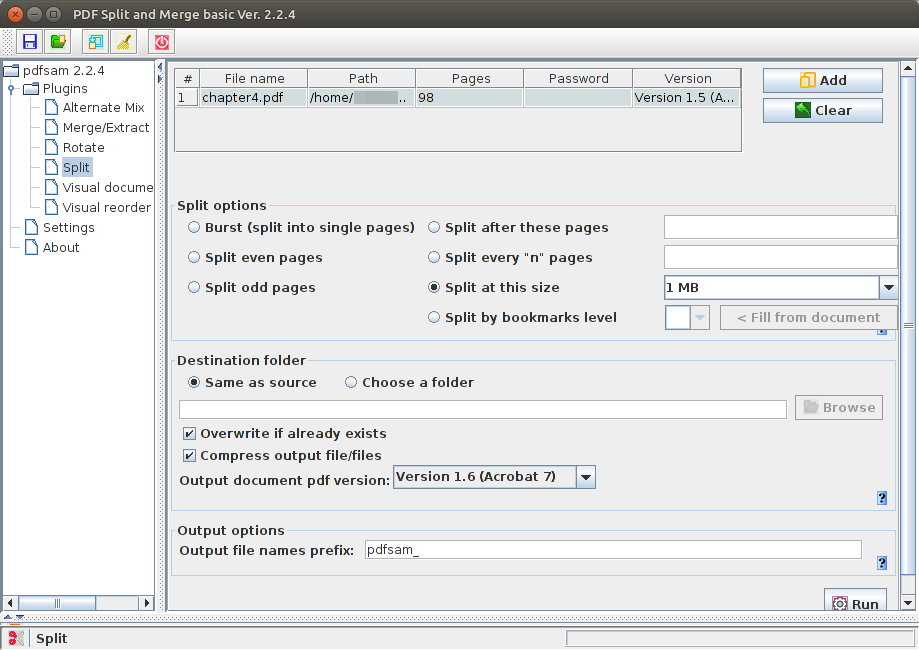
After extraction, open each page file in Adobe Reader. If some pages open correctly, merge them using PDFsam’s ‘Merge’ mode to rebuild the document. This technique is similar to how you’d repair pdf after transfer if pages got truncated.
Step 3: Use an online repair service
Online tools can fix many common PDF errors without installing software. Try a reputable pdf repair service like iLovePDF or Smallpdf. Upload your file (up to 100 MB for free), let the server process it, and download the repaired version. Be cautious with sensitive documents—use a local method for confidential files.
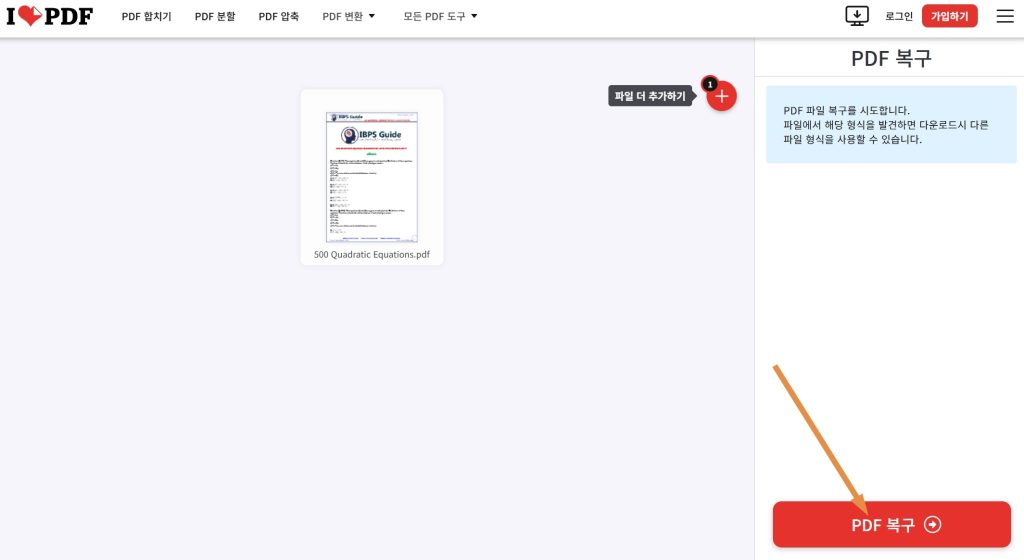
If the online service works, you’re done. If not, or if the PDF won’t open in Chrome (common after transfer), see our guide on how to fix pdf not opening in chrome.
Step 4: Repair using command-line tools (Poppler)
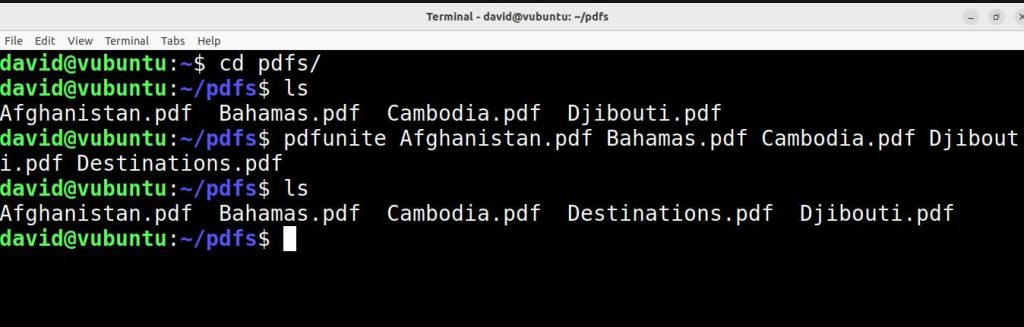
For advanced users, Poppler’s pdfunite and pdftocairo can salvage broken PDFs. Install Poppler (e.g., using Homebrew on macOS: brew install poppler). Run ‘pdfunite corrupted.pdf output.pdf’ to merge the file’s internal structure. If that fails, try ‘pdftocairo -pdf corrupted.pdf output.pdf’ which rasterizes the pages. This approach is covered in our open source pdf repair article.
Common pitfalls
- Saving over the original file before testing. Always keep a backup of the original corrupted PDF.
- Using unreliable online services that may not support large files or could compromise privacy. Stick to well-known platforms.
- Overlooking simple fixes like updating Adobe Reader or disabling Protected Mode. Many issues are permission-related.
Where to next
If you’ve restored your PDF, great! To avoid future corruption, always download files completely before opening and use a reliable connection for transfers. For more advanced recovery, explore our guides on command line pdf repair and how to recover a pdf from a hard drive. Got a specific error? Our library of PDF repair tips has you covered.
A corrupted PDF is rarely lost for good. With the right tools, you can salvage almost any file.
PDF Repair & Tools team




